
Appearance
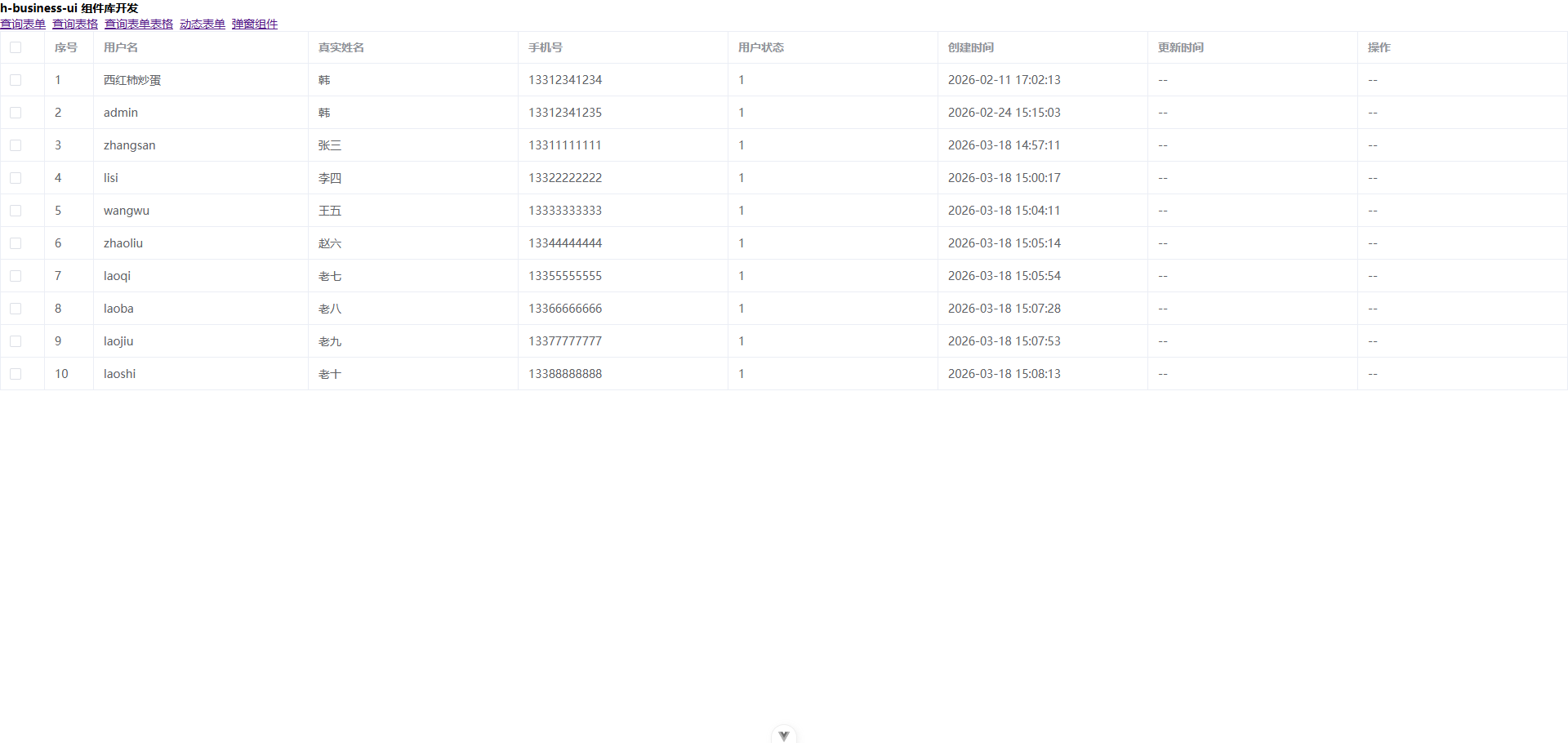
最基础的表格,没啥特殊的功能,就是个可以分页选择、可回显选择的表格。方便一点吧。
数据都是需要你自己传入的(tableData),后面会有个组合的表格(查询表格),就是查询表单和这个组件拼在一起的。
格式化字典的函数也需要你自己传入。在组合表格中有示例。
vue
<template>
  <QueryTable
    ref="tableRef"
    :columns="columns"
    :tableData="tableData"
    :pageParams="pageParams"
    :formatDic="formatDic"
    rowKey="id"
    @checkedChange="handleCheckedChange"></QueryTable>
</template>

<script setup>
import { ref } from "vue";
import { QueryTable } from "h-business-ui";

// 格式化字典值
const formatDic = (dictName, value) => {
  if (dictName === "user_status") {
    return value === 1 ? "正常" : "禁用";
  }
  return value;
}

// 表格ref
const tableRef = ref();

// 表格列配置
const tableColumns = [
  {
    label: "用户名",
    prop: "username",
  },

  {
    label: "真实姓名",
    prop: "realName",
  },

  {
    label: "手机号",
    prop: "phone",
  },

  {
    label: "用户状态",
    prop: "status",
  },

  {
    label: "创建时间",
    prop: "createTime",
  },

  {
    label: "更新时间",
    prop: "updateTime",
  },

  {
    label: "操作",
    prop: "action",
  },
];

// 表格数据
const tableData = ref([
  {
    id: 2,
    tenantId: 1,
    username: "西红柿炒蛋",
    password: null,
    realName: "li",
    phone: "13312341234",
    status: 1,
    createTime: "2026-02-11 17:02:13",
    updateTime: null,
  },
  {
    id: 3,
    tenantId: 1,
    username: "admin",
    password: null,
    realName: "li",
    phone: "13312341235",
    status: 1,
    createTime: "2026-02-24 15:15:03",
    updateTime: null,
  },
  {
    id: 4,
    tenantId: 1,
    username: "zhangsan",
    password: null,
    realName: "张三",
    phone: "13311111111",
    status: 1,
    createTime: "2026-03-18 14:57:11",
    updateTime: null,
  },
  {
    id: 5,
    tenantId: 1,
    username: "lisi",
    password: null,
    realName: "李四",
    phone: "13322222222",
    status: 1,
    createTime: "2026-03-18 15:00:17",
    updateTime: null,
  },
  {
    id: 6,
    tenantId: 1,
    username: "wangwu",
    password: null,
    realName: "王五",
    phone: "13333333333",
    status: 1,
    createTime: "2026-03-18 15:04:11",
    updateTime: null,
  },
  {
    id: 7,
    tenantId: 1,
    username: "zhaoliu",
    password: null,
    realName: "赵六",
    phone: "13344444444",
    status: 1,
    createTime: "2026-03-18 15:05:14",
    updateTime: null,
  },
  {
    id: 8,
    tenantId: 1,
    username: "laoqi",
    password: null,
    realName: "老七",
    phone: "13355555555",
    status: 1,
    createTime: "2026-03-18 15:05:54",
    updateTime: null,
  },
  {
    id: 9,
    tenantId: 1,
    username: "laoba",
    password: null,
    realName: "老八",
    phone: "13366666666",
    status: 1,
    createTime: "2026-03-18 15:07:28",
    updateTime: null,
  },
  {
    id: 10,
    tenantId: 1,
    username: "laojiu",
    password: null,
    realName: "老九",
    phone: "13377777777",
    status: 1,
    createTime: "2026-03-18 15:07:53",
    updateTime: null,
  },
  {
    id: 11,
    tenantId: 1,
    username: "laoshi",
    password: null,
    realName: "老十",
    phone: "13388888888",
    status: 1,
    createTime: "2026-03-18 15:08:13",
    updateTime: null,
  },
]);

// 分页参数,用于计算序号。注:此处不是分页功能,而是用于计算序号的参数
const pageParams = ref({
  current: 1,
  size: 10,
});

/**
 * 选中状态变化处理
 * @param {boolean} isCheck - 是否选中
 * @param {number} length - 选中的个数,未选中时是0
 */
const handleCheckedChange = (isCheck, length) => {
  console.log(isCheck, length);
};
</script>
| 属性 | 类型 | 默认值 | 描述 |
|---|---|---|---|
columns | Array | - | 表格列配置。请查看columns说明 |
tableData | Array | - | 表格数据 |
pageParams | Object | - | 分页参数 |
rowKey | string | ((row: unknown) => string) | id | 行数据的 Key,与element-plus的rowKey属性一致。 |
checkedChange | Function | - | 选中状态变化处理 |
showLog | boolean | false | 是否显示日志,开启后会在表格的上方显示勾选的数据 |
enableSelection | boolean | true | 是否开启选择列。注:若关闭时,请将enableRowClick设置为false |
enableRowClick | boolean | true | 是否开启行点击事件 |
formatDic | Function | (dictName, dictValue) => string | 字典格式化函数,参数为字典名称和字典值,返回格式化后的字符串。 |
allowClickSelect | (row: unknown) => boolean | () => true | 是否允许点击行选中,作用与selectable类似,只不过是来限制点击行是否可以选。 |
selectable | (row: unknown) => boolean | () => true | 决定行是否可以勾选,与element-plus的selectable属性一致。 |
columns说明
| 属性 | 类型 | 默认值 | 描述 |
|---|---|---|---|
label | string | - | 列的标题 |
prop | string | - | 列的属性名,用于绑定数据的属性。 |
tableColumnProps | Record<string, unknown> | - | 与element-plus的表格列属性一致。查看 |
dict | boolean | false | 字典名称,用于格式化数据。当启用时不传dictName时,会使用prop的值作为字典名称。若传入dictName,则会使用dictName作为字典名称。 |
dictName | string | - | 字典名称,用于格式化数据。若传入dictName,则会使用dictName作为字典名称。 |
| 插槽名 | 作用域 | 说明 |
|---|---|---|
${column.prop}-header | scope | 列头插槽,与element-plus的表格列插槽一致。 查看 |
${column.prop} | { row, index } | 列内容插槽 |
${column.prop}-filter-icon | scope | 过滤器图标插槽 查看 |
${column.prop}-expand | scope | 展开插槽 查看 |
插槽示例
vue
<template>
  <QueryTable
    ref="tableRef"
    :columns="columns"
    :tableData="tableData"
    :pageParams="pageParams"
    rowKey="id"
    @checkedChange="handleCheckedChange">
      <!-- username的插槽 插槽名是columns的prop值 -->
      <template #username={ row, index, name }>
        <el-tag size="small" type="primary">{{ row.name }}</el-tag>
      </template>

      <!-- username的插槽 插槽名是columns的prop值拼接-header -->
      <template #username-header={ row, index, name }>
        <el-tag size="small" type="primary">{{ row.name }}</el-tag>
      </template>

      <!-- filter-icon的插槽 插槽名是columns的prop值拼接-filter-icon -->
      <template #username-filter-icon="scope">
        <el-icon>
          <Search />
        </el-icon>
      </template>

      <!-- expand的插槽 插槽名是columns的prop值拼接-expand -->
      <template #username-expand="scope">
        <el-button type="primary" size="mini">展开</el-button>
      </template>

      <!-- status的插槽 插槽名是columns的prop值 -->
      <template #status={ row, index, name }>
        <el-tag size="small" type="success">{{ row.status === 1 ? '正常' : '停用' }}</el-tag>
      </template>

      <!-- action的插槽 插槽名是columns的prop值 -->
      <template #action={ row, index, name }>
        <el-button type="primary" size="mini">编辑</el-button>
        <el-button type="danger" size="mini">删除</el-button>
      </template>
  </QueryTable>
</template>
| 事件名 | 参数 | 说明 |
|---|---|---|
checkedChange | (isCheck: boolean, length: number) | 选中状态变化事件, isCheck为选中状态, length为选中个数 |
| 方法名 | 参数 | 返回值 | 说明 |
|---|---|---|---|
getSelectionData | 无 | [unknown[], unknown[]] | 获取选中的数据,返回 [选中的ID数组, 选中的行数据数组] |
echoCheckedData | checkedData?: (string | number)[] | 无 | 回显选中数据,rowKey的值即可 |
clearMultipleCheckedDataMap | ids?: (string | number)[] | 无 | 清除指定选中数据,不传参数则清除所有 |
tableRef | 无 | Ref<TableInstance | undefined> | el-table 表格实例引用 |
typescript
// 表格列配置接口
export interface QueryTableColumn {
  prop: string;
  label: string;
  tableColumnProps?: Record<string, unknown>;
  dict?: boolean;
  dictName?: string;
}

// 组件暴露接口
export interface QueryTableExpose {
  /** 表格实例引用 */
  tableRef: Ref<TableInstance | undefined>;
  /** 获取选中的数据 */
  getSelectionData: () => unknown[];
  /** 回显选中数据 */
  echoCheckedData: (data?: number[]) => void;
  /** 清除选中数据映射表 */
  clearMultipleCheckedDataMap: (ids?: (string | number)[]) => void;
}

// 组件属性接口
export interface Props {
  /** 当前页 */
  pageParams: {
    current: number;
    size: number;
  };

  /** 表格列配置 */
  columns: QueryTableColumn[];

  /** 是否显示日志 */
  showLog?: boolean;

  /** 行格行键 */
  rowKey?: string | ((row: unknown) => string);

  /** 表格数据 */
  tableData: unknown[];

  /** 是否开启选择列 */
  enableSelection?: boolean;

  /** 选择列类型 */
  selectionType?: "multiple" | "single";

  /** 格式化字典 */
  formatDic?: (dictName: string, dictValue: string) => string;

  /** 是否开启行点击事件 */
  enableRowClick?: boolean;

  /** 是否允许点击行选中 */
  allowClickSelect?: (row: unknown) => boolean;

  /** 用来决定这一行的 CheckBox 是否可以勾选 */
  selectable?: (row: unknown) => boolean;
}