
Appearance
这就是前面说到的组合表格组件,它将表单和表格合并在一起,方便用户进行数据的录入和查看。 请看截图 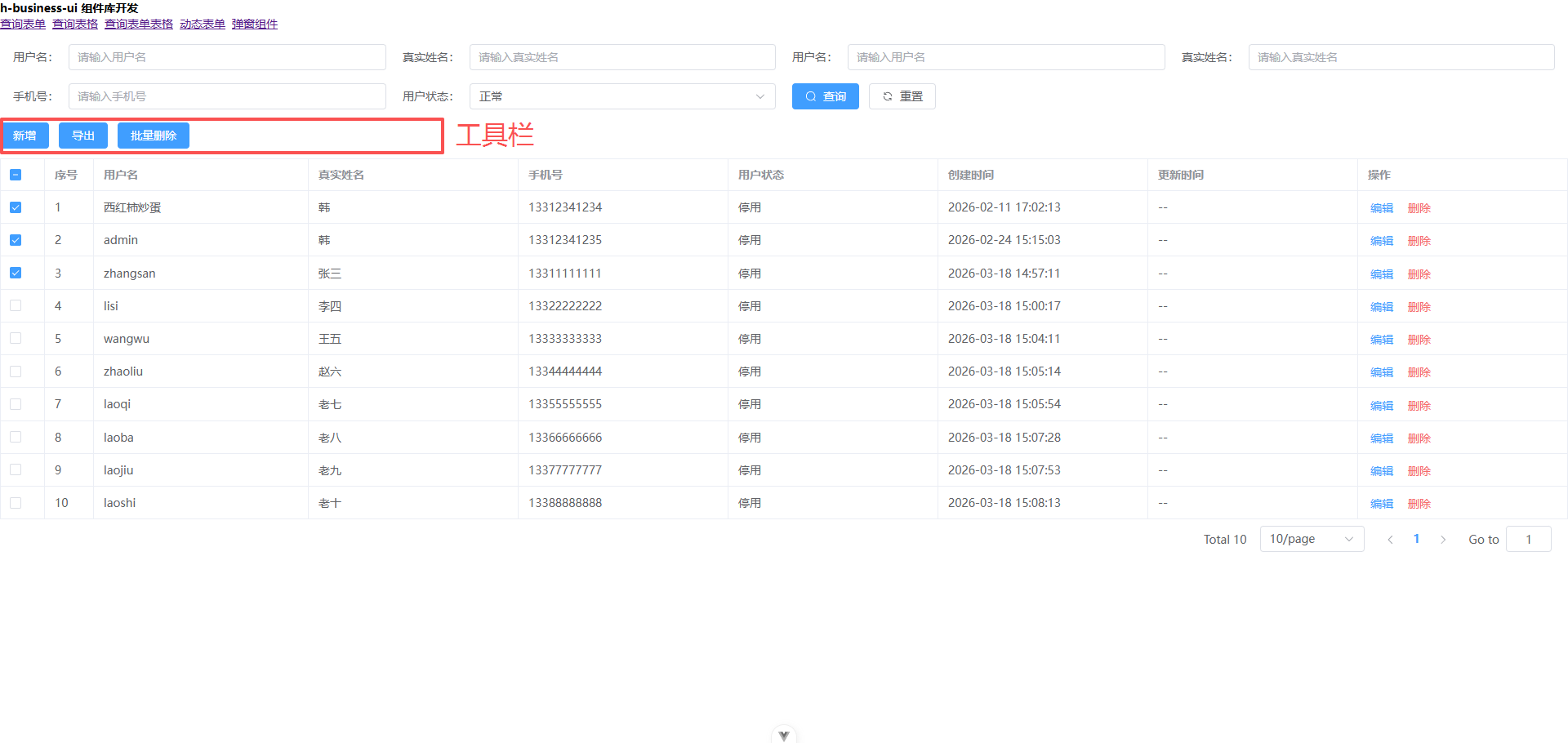
因autoLoad默认为true,所以不需要手动调用search方法。页面加载时会自动调用api传入的接口函数,加载表格数据。
vue
<template>
  <QueryFormTable
    class="user"
    ref="queryFormTableRef"
    :api="getList"
    :formColumns="formColumns"
    :formatParams="formatParams"
    :setDefaultValues="setDefaultValues"
    :tableColumns="tableColumns"
    :showSearchReset="true"
    :isFullscreen="false"
    :showToolbar="true"
    :tableAttrs="{
      formatDic,
    }"
    @click="onTableClick">
    <template #searchIcon>
      <el-space>
        <el-icon>
          <Search />
        </el-icon>
        查询
      </el-space>
    </template>

    <template #resetIcon>
      <el-space>
        <el-icon>
          <Refresh />
        </el-icon>
        重置
      </el-space>
    </template>

    <template #action="{ row, index }">
      <el-button type="primary" link size="small" @click.stop="edit(row, index)"
        >编辑</el-button
      >
      <el-button type="danger" link size="small" @click.stop="del(row, index)"
        >删除</el-button
      >
    </template>
  </QueryFormTable>
</template>

<script setup lang="ts">
import { ref } from "vue";
import { Search, Refresh } from "@element-plus/icons-vue";

const formatDic = (dictName: string, value: unknown) => {
  if (dictName === "status") {
    return value === "1" ? "正常" : "停用";
  }
  return value;
};

const queryFormTableRef = ref(null);

const formColumns = [
  {
    label: "用户名",
    prop: "username",
    comType: "input",
  },
  {
    label: "真实姓名",
    prop: "realName",
    comType: "input",
  },
  {
    label: "用户名",
    prop: "username",
    comType: "input",
  },
  {
    label: "真实姓名",
    prop: "realName",
    comType: "input",
  },

  {
    label: "手机号",
    prop: "phone",
    comType: "input",
  },

  {
    label: "用户状态",
    prop: "status",
    comType: "select",
    options: [
      {
        label: "正常",
        value: "1",
      },
      {
        label: "停用",
        value: "0",
      },
    ],
  },
];

const tableColumns = [
  {
    label: "用户名",
    prop: "username",
  },

  {
    label: "真实姓名",
    prop: "realName",
  },

  {
    label: "手机号",
    prop: "phone",
  },

  {
    label: "用户状态",
    prop: "status",
    dict: true,
  },

  {
    label: "创建时间",
    prop: "createTime",
  },

  {
    label: "更新时间",
    prop: "updateTime",
  },

  {
    label: "操作",
    prop: "action",
  },
];

const setDefaultValues = (form: Record<string, unknown>) => {
  form.status = "1";
};

const formatParams = (params: Record<string, unknown>, type: string) => {
  console.log(type);
  return {
    ...params,
  };
};

const onTableClick = (command: string, ...args: unknown[]) => {
  console.log("otherBtn", command, ...args);
};

const edit = (row: Record<string, unknown>, index: number) => {
  console.log(row, index);
};

const del = (row: Record<string, unknown>, index: number) => {
  console.log(row, index);
};

const getList = () => {
  console.log("loading");
  return new Promise((resolve) => {
    resolve({
      list: [
        {
          id: 2,
          tenantId: 1,
          username: "西红柿炒蛋",
          password: null,
          realName: "韩",
          phone: "13312341234",
          status: 1,
          createTime: "2026-02-11 17:02:13",
          updateTime: null,
        },
        {
          id: 3,
          tenantId: 1,
          username: "admin",
          password: null,
          realName: "韩",
          phone: "13312341235",
          status: 1,
          createTime: "2026-02-24 15:15:03",
          updateTime: null,
        },
        {
          id: 4,
          tenantId: 1,
          username: "zhangsan",
          password: null,
          realName: "张三",
          phone: "13311111111",
          status: 1,
          createTime: "2026-03-18 14:57:11",
          updateTime: null,
        },
        {
          id: 5,
          tenantId: 1,
          username: "lisi",
          password: null,
          realName: "李四",
          phone: "13322222222",
          status: 1,
          createTime: "2026-03-18 15:00:17",
          updateTime: null,
        },
        {
          id: 6,
          tenantId: 1,
          username: "wangwu",
          password: null,
          realName: "王五",
          phone: "13333333333",
          status: 1,
          createTime: "2026-03-18 15:04:11",
          updateTime: null,
        },
        {
          id: 7,
          tenantId: 1,
          username: "zhaoliu",
          password: null,
          realName: "赵六",
          phone: "13344444444",
          status: 1,
          createTime: "2026-03-18 15:05:14",
          updateTime: null,
        },
        {
          id: 8,
          tenantId: 1,
          username: "laoqi",
          password: null,
          realName: "老七",
          phone: "13355555555",
          status: 1,
          createTime: "2026-03-18 15:05:54",
          updateTime: null,
        },
        {
          id: 9,
          tenantId: 1,
          username: "laoba",
          password: null,
          realName: "老八",
          phone: "13366666666",
          status: 1,
          createTime: "2026-03-18 15:07:28",
          updateTime: null,
        },
        {
          id: 10,
          tenantId: 1,
          username: "laojiu",
          password: null,
          realName: "老九",
          phone: "13377777777",
          status: 1,
          createTime: "2026-03-18 15:07:53",
          updateTime: null,
        },
        {
          id: 11,
          tenantId: 1,
          username: "laoshi",
          password: null,
          realName: "老十",
          phone: "13388888888",
          status: 1,
          createTime: "2026-03-18 15:08:13",
          updateTime: null,
        },
      ],
      total: 10,
    });
  });
};
</script>

<style lang="less" scoped></style>
| 属性 | 类型 | 默认值 | 说明 |
|---|---|---|---|
isFullscreen | Boolean | false | 是否是满屏模式: 满屏模式下,查询表单和表格会占满整个屏幕,不存在滚动条。否则,查询表单和表格会占满屏幕的一半,存在滚动条。 |
formColumns | Array | - | 表单列配置 |
tableColumns | Array | - | 表格列配置 |
api | Function<Record<string, unknown>> => Promise<Record<string, unknown>> | - | 接口函数 |
autoLoad | Boolean | true | 自动加载数据 |
formatLoadTableDataAfter | res => ({list: [], total:0}) | Function | 格式化加载表格数据后的结果 |
formAttrs | Object | - | 表单属性 |
tableAttrs | Object | - | 表格属性 |
showToolbar | Boolean | true | 是否显示表格工具栏 |
defaultToolbarBtn | Array | ["add", "export", "delete"] | 默认表格工具栏按钮 |
| 事件名 | 参数 | 说明 |
|---|---|---|
click | (type, checkedData, checkedDataValues) => {} | 表格上的默认点击事件,type: 'add | export | delete', checkedData: 选中的行数据ids, checkedDataValues: 选中的行数据的值 |
tableCheckedChange | (hasValue, length) => {} | 选择表格事件,hasValue: 是否选择,length: 选中多少条数据,这个会在禁用某一个按钮时有用 |
| 方法名 | 参数 | 说明 |
|---|---|---|
search | 无 | 加载表格数据 |
reset | 无 | 重置查询表格数据 |
refreshTable | 无 | 刷新表格数据 |
typescript
export interface Props {
  /** 是否是满屏模式 */
  isFullscreen?: boolean;

  /** 表单列配置 */
  formColumns: QueryFormColumn[];

  /** 表格列配置 */
  tableColumns: QueryTableColumn[];

  /** 接口函数 */
  api: (
    params: Record<string, unknown>,
    cancelToken?: CancelToken,
  ) => Promise<unknown>;

  /** 是否自动加载表格数据 */
  autoLoad?: boolean;

  /** 格式化加载表格数据后的结果 */
  formatLoadTableDataAfter?: (res: Record<string, unknown>) => {
    list: unknown[];
    total: number;
  };

  /** 表单属性 */
  formAttrs?: Record<string, unknown>;

  /** 表格属性 */
  tableAttrs?: Record<string, unknown>;

  /** 是否显示工具栏 */
  showToolbar?: boolean;

  /** 默认显示的工具栏按钮 */
  defaultToolbarBtn?: string[];
}

export interface QueryFormTableExpose {
  /** 刷新表格数据 */
  refreshTable: () => void;
  /** 重置查询单 */
  reset: () => void;
  /** 搜索 */
  search: () => void;
}